Design
The examples on this page demonstrate how to drive the full BED workflow
(BDIM → BNSM) using a geometry object — either loaded from an Excel file
(CustomGeometry) or built
programmatically (StandardGeometry).
A final section shows how to visualise the resulting design in 3-D using the
design_plotter utility.
Design with a custom geometry
A geometry exported with
write_mesh_to_xlsx()
can be reloaded as a
CustomGeometry object and used
directly in design.
import matplotlib.pyplot as plt
from pathlib import Path
from simdesign import rcmrf

input_path = Path("example-custom-geometry.xlsx")
custom_frame = rcmrf.CustomGeometry(input_path)
custom_frame.add_new_elements_for_stairs()

taxonomy_data = {
    "beta": 0.1,
    "beam_type": 2,
    "column_section": 1,
    "concrete_grade": "B225",
    "design_class": "eu_cdl",
    "quality": 1,
    "slab_type": 1,
    "steel_grade": "A40",
    "geometry": custom_frame,
}
taxonomy = rcmrf.TaxonomyData(**taxonomy_data)

bdim = rcmrf.BDIM(taxonomy)
bdim.run_iterative_design_algorithm()

if bdim.ok:
    bdim.to_csv(Path("Outputs/BDIM-Data"))

    bnsm = rcmrf.BNSM(
        design=bdim,
        model="DP02",
        scheme="EQL",
        dincr=5e-4,
        max_drift=0.1,
        include_infills=False,
    )
    bnsm.to_py(Path("Outputs/OpsPy-Model"))
    bnsm.to_tcl(Path("Outputs/OpsTcl-Model"))

    bnsm.do_modal(num_modes=2, out_dir=Path("Outputs/Modal-Results"))
    bnsm.plot_model(directory=Path("Outputs"), show=True)
    bnsm.plot_mode_shape(mode_number=1, contour="x", show=True, directory=Path("Outputs"))
    bnsm.plot_mode_shape(mode_number=2, contour="y", show=True, directory=Path("Outputs"))

    dx, vx, _ = bnsm.do_nspa(ctrl_dof=1, out_dir=Path("Outputs/NSPA-X"))
    dy, vy, _ = bnsm.do_nspa(ctrl_dof=2, out_dir=Path("Outputs/NSPA-Y"))

    plt.plot(dx, vx, label="X-dir")
    plt.plot(dy, vy, label="Y-dir")
    plt.xlabel("Control Node Displacement [m]")
    plt.ylabel("Base Shear [kN]")
    plt.legend()
    plt.savefig(Path("Outputs/nspa.svg"), dpi=300)
    plt.close()
Design with a specific geometry
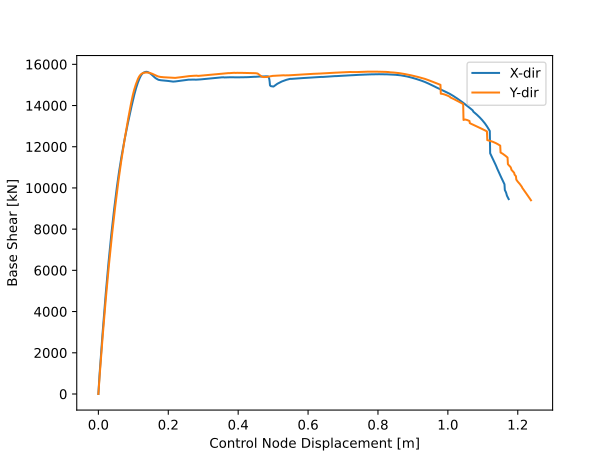
This example shows an 8-storey, 7×5-bay RC-MRF with a non-uniform layout: two staircase bays, several modified bay widths, a modified ground-floor height, and column rotation angles and section shapes assigned per grid position.
Building geometry
from pathlib import Path
import matplotlib.pyplot as plt
from simdesign.rcmrf import StandardGeometry
from simdesign import rcmrf

outdir = Path("Outputs/specific-frame")

regular_frame = StandardGeometry(
    num_storeys=8,
    storey_height=3.0,
    num_bays_x=7,
    bay_width_x=5.0,
    num_bays_y=5,
    bay_width_y=5.0,
)

# Two staircase bays
regular_frame.set_continuous_stairs_rectangles(
    stair_loc=(1, 2), stairs_width_x=2.5, stairs_width_y=3.3
)
regular_frame.set_continuous_stairs_rectangles(
    stair_loc=(5, 2), stairs_width_x=2.5, stairs_width_y=3.3
)

# Non-uniform floor heights and bay widths
regular_frame.modify_floor_height(floor_id=1, height=3.4)
regular_frame.modify_bay_width(bay_id=2, width=3.3, direction="x")
regular_frame.modify_bay_width(bay_id=4, width=3.3, direction="x")
regular_frame.modify_bay_width(bay_id=6, width=3.3, direction="x")
regular_frame.modify_bay_width(bay_id=3, width=3.3, direction="y")

# Exterior infills only
regular_frame.add_infills(
    exterior=True, interior=False, ext_type="Medium", int_type="Weak"
)

regular_frame.write_mesh_to_xlsx(outdir / "geometry.xlsx")
regular_frame.add_new_elements_for_stairs(infills=True)
regular_frame.export_mesh_to_html(str(outdir / "geometry.html"))
Column rotation angles
The rot_angle attribute controls the orientation of a column’s cross-section
in the horizontal plane. Two values are supported:
0.0— the strong axis is aligned with the global X direction.90.0— the strong axis is aligned with the global Y direction.
Grids not listed in either group keep the default angle assigned during
geometry construction. Each grid is identified by its (ix, iy) position in
the plan.
# Grids whose columns have their strong axis along X (rot_angle = 0°)
grids_x = [
    (1, 0), (2, 0), (3, 0), (4, 0), (5, 0), (6, 0),  # front facade
    (1, 5), (2, 5), (3, 5), (4, 5), (5, 5), (6, 5),  # back facade
]
# Grids whose columns have their strong axis along Y (rot_angle = 90°)
grids_y = [
    (0, 1), (0, 2), (0, 3), (0, 4),  # left facade
    (1, 1), (1, 2), (1, 3), (1, 4),
    (2, 1), (2, 2), (2, 3), (2, 4),
    (5, 1), (5, 2), (5, 3), (5, 4),
    (6, 1), (6, 2), (6, 3), (6, 4),
    (7, 1), (7, 2), (7, 3), (7, 4),  # right facade
]

# Apply rotation angles to all vertical elements at the listed grids
for grid, lines in regular_frame.continuous_lines_along_z.items():
    for line in lines:
        if grid in grids_x:
            line.rot_angle = 0.0
        elif grid in grids_y:
            line.rot_angle = 90.0
Simulated design (BDIM) with mixed column sections
taxonomy_data = {
    "beta": 0.09,
    "beam_type": 2,
    "column_section": 1,
    "slab_type": 1,
    "concrete_grade": "C30/37",
    "design_class": "eu_cdh",
    "quality": 0,
    "slab_orientation": 3,
    "steel_grade": "S500",
    "geometry": regular_frame,
}
taxonomy = rcmrf.TaxonomyData(**taxonomy_data)
bdim = rcmrf.BDIM(taxonomy)

# Corner and staircase grids keep square sections (section=1);
# all other frame columns get rectangular sections (section=2)
grids_s = [
    (0, 0), (7, 0), (0, 5), (7, 5),
    (3, 1), (4, 1), (3, 2), (4, 2),
    (3, 3), (4, 3), (3, 4), (4, 4),
]
for grid, columns_list in bdim.continuous_columns.items():
    for columns in columns_list:
        for column in columns:
            column.section = 2 if grid in grids_x + grids_y else 1

bdim.run_iterative_design_algorithm()
bdim.to_csv(outdir / "design")
Nonlinear model and analysis (BNSM)
bnsm = rcmrf.BNSM(
    design=bdim,
    scheme="EQL",
    dincr=1e-3,
    max_drift=0.1,
    model="DP04",
    include_infills=True,
)
bnsm.to_py(outdir / "OpsPy-Model")
bnsm.to_tcl(outdir / "OpsTcl-Model")

bnsm.do_modal(num_modes=3, out_dir=outdir / "Modal-Results")
bnsm.plot_model(directory=outdir, show=False)
bnsm.plot_mode_shape(mode_number=1, contour="y", show=False, directory=outdir)
bnsm.plot_mode_shape(mode_number=2, contour="x", show=False, directory=outdir)
dx, vx, _ = bnsm.do_nspa(ctrl_dof=1, out_dir=outdir / "NSPA-Results")
dy, vy, _ = bnsm.do_nspa(ctrl_dof=2, out_dir=outdir / "NSPA-Results")

plt.plot(dx, vx, label="X-dir")
plt.plot(dy, vy, label="Y-dir")
plt.xlabel("Control Node Displacement [m]")
plt.ylabel("Base Shear [kN]")
plt.legend()
plt.savefig(outdir / "nspa.svg", dpi=300)
plt.close()
Note
The full source script for this example is available at
scripts/design_with_specific_geometry.py in the repository.
Visualising the design
The scripts/design_plotter.py utility reads the CSV outputs written by
to_csv() and renders a 3-D
model of beams, columns, slabs, staircases, and (optionally) infill panels
using PyVista.
To use it, point design_dir to the folder produced by bdim.to_csv()
and set infills_flag = True if infills were included in the design:
import pyvista as pv
import pandas as pd
from pathlib import Path
from scripts.design_plotter import (
    create_beam, create_column, create_slab, create_staircase
)

infills_flag = False
design_dir   = Path("Outputs/specific-frame/design")

beams    = pd.read_csv(design_dir / "beams.csv")
columns  = pd.read_csv(design_dir / "columns.csv")
slabs    = pd.read_csv(design_dir / "slabs.csv")
stairs   = pd.read_csv(design_dir / "stairs.csv")
infills  = pd.read_csv(design_dir / "infills.csv")
joints   = pd.read_csv(design_dir / "joints.csv")
df_nodes = joints.set_index("id")

plotter = pv.Plotter()

beam_meshes = pv.MultiBlock()
for _, row in beams.iterrows():
    nI, nJ   = row["node_i"], row["node_j"]
    coordsI  = df_nodes.loc[nI, ["x-coord [m]", "y-coord [m]", "z-coord [m]"]].to_numpy()
    coordsJ  = df_nodes.loc[nJ, ["x-coord [m]", "y-coord [m]", "z-coord [m]"]].to_numpy()
    beam_meshes.append(create_beam(coordsI, coordsJ, row["b [mm]"] / 1000, row["h [mm]"] / 1000))
plotter.add_mesh(beam_meshes.combine(), color="red")

column_meshes = pv.MultiBlock()
for _, row in columns.iterrows():
    nI, nJ   = row["node_i"], row["node_j"]
    coordsI  = df_nodes.loc[nI, ["x-coord [m]", "y-coord [m]", "z-coord [m]"]].to_numpy()
    coordsJ  = df_nodes.loc[nJ, ["x-coord [m]", "y-coord [m]", "z-coord [m]"]].to_numpy()
    column_meshes.append(create_column(coordsI, coordsJ, row["bx [mm]"] / 1000, row["by [mm]"] / 1000))
plotter.add_mesh(column_meshes.combine(), color="blue")

slab_meshes = pv.MultiBlock()
for _, row in slabs.iterrows():
    coords = [
        df_nodes.loc[row[n], ["x-coord [m]", "y-coord [m]", "z-coord [m]"]].to_numpy()
        for n in ["node_1", "node_2", "node_3", "node_4"]
    ]
    slab_meshes.append(create_slab(*coords, row["t [mm]"] / 1000))
plotter.add_mesh(slab_meshes.combine(), color="lightgray", opacity=0.6)

if stairs.any().any():
    stair_meshes = create_staircase(stairs, df_nodes)
    plotter.add_mesh(stair_meshes.combine(), color="green")

# Export an interactive HTML file and open the interactive window
plotter.export_html("specific-design.html")
plotter.show()
The interactive visualisation below was produced by the example above for the 8-storey specific-geometry building (beams in red, columns in blue, slabs in grey, staircases in green):